 superbrickGet the app ↗
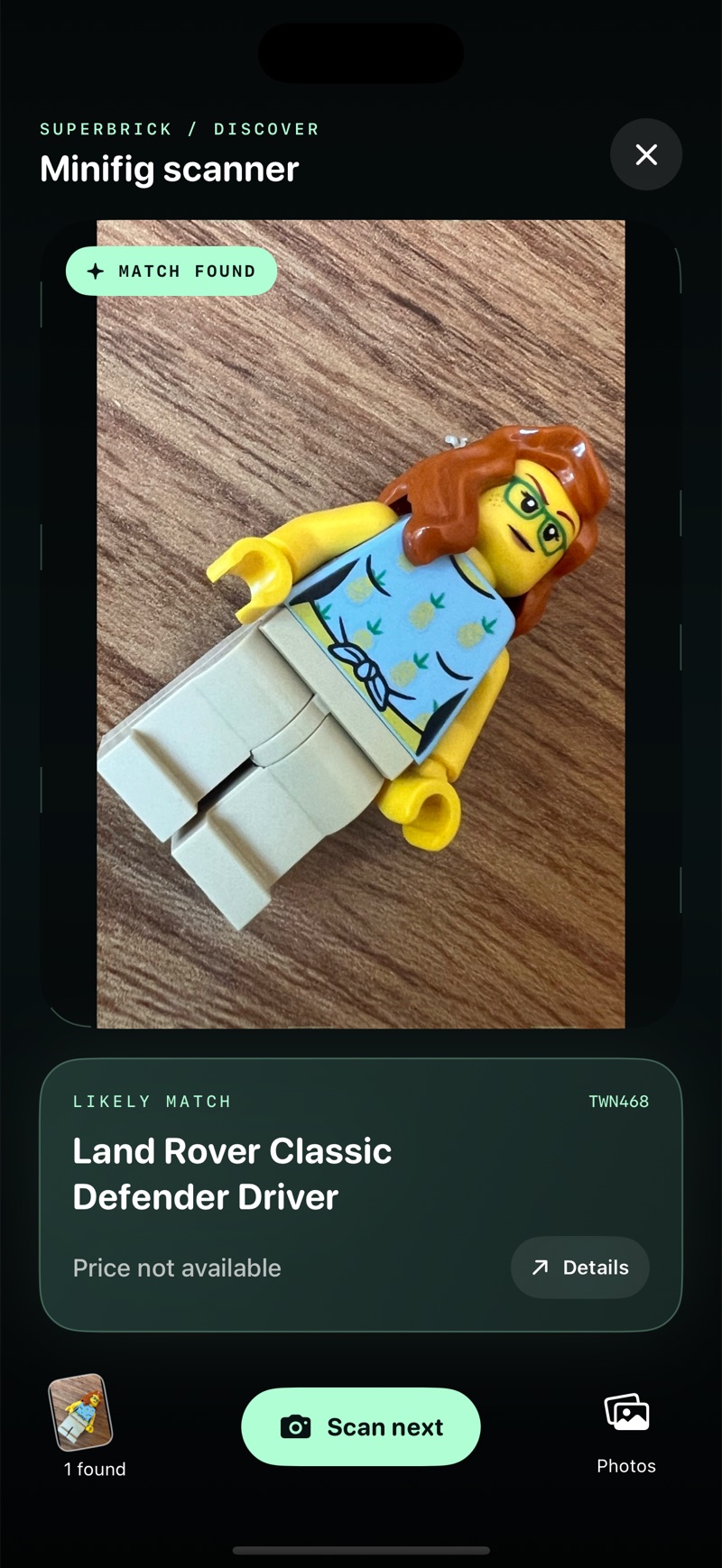
From a mystery figure to a collection entry
- Open Scan, then Scan minifigs in Superbrick.
- Take a clear photo or choose one with Photos.
- Compare the suggested match with the figure in your hand. Change it or take another photo if the details differ.
- Add the confirmed figure to your collection and adjust its quantity.
A real scan, with a result you can check
The example screen shows a likely match for twn468, Land Rover Classic Defender Driver. Compare the glasses, pineapple shirt, hair and legs with the catalog figure before saving it. The result is a suggestion that you review.
That recording also says Price not available. Recognizing a figure and having a current estimate are separate things. A missing quote should stay missing; it is not a reason to assign the figure a value of zero.
Look beyond the name
An identification is a starting point. Explore where the exact figure appears, check available price estimates, or save it alongside the loose figures you already own. A head, torso or accessory swapped by a previous owner can change the right match.
- Review possible matches before saving.
- Explore All known sets or narrow the view to My sets.
- Keep loose figures separate from the figures included in your sets.
Start with five free minifigure scans
Superbrick includes five free successful minifigure scans, plus a separate allowance of five set scans. These are starting allowances, not daily refills. Pro unlocks scanning beyond the allowance. Current purchase options and other access limits are shown in the app.
A clearer photo makes a better starting point
Use one complete figure, facing the camera, in good light. Let the torso, face and legs remain visible. If you get an uncertain result, check the variants or try another angle. Identification uses an online service; price coverage varies and some figures have no available quote.
Photo identification or sealed-box scanning?
| What you have | What to use |
|---|---|
| A loose, visible minifigure | Photograph the figure and compare its details. This is Superbrick’s minifigure workflow. |
| An unopened collectible-minifigure box | A compatible box-code decoder is a different tool. Superbrick does not identify a sealed mystery box from its code. |
| A box of loose bricks | This minifigure workflow does not generate builds from a pile of pieces. |
Questions collectors ask
Is this a free LEGO scanner online?
Scanning happens in the Superbrick app, not on this website. Five successful minifigure scans are included as a starting allowance; they do not refill daily.
Can I use the minifigure identifier on iPhone or iPad?
Yes. Use the in-app camera or choose a photo. Identification needs an internet connection. Superbrick does not currently offer an Android app.
Will it identify every figure correctly?
No identification tool can promise a correct match for every photo. Review the head, torso, legs and accessories, especially if parts may have been swapped. A match is not an authenticity certificate.