 superbrickGet the app ↗
Prepare the figure before the photo
Place the figure against a simple background with its front facing the camera. Keep nearby figures out of the shot. Make sure the torso printing and legs are visible; a large accessory held across the body can hide a useful clue.
If the figure came from a mixed box, its head, hair or legs may have been swapped. Photograph what you actually have and treat the result as a candidate to compare, rather than proof that all the pieces belong together.
Identify it in Superbrick
- Open Superbrick and tap Scan → Scan minifigs.
- Use the camera capture button, or tap Photos to select an existing picture.
- Read the suggested match. If the app asks you to Check match, use Choose to compare the possibilities.
- Use Change or Take another photo when the result does not fit.
- Tap Add after confirming the figure, or Review when there are multiple pending results.
Check the details that separate variants
| Check | Look for |
|---|---|
| Head | Facial expression, glasses, beard and front/back printing. |
| Torso | Printed costume, colors and small markings. |
| Legs | Color, printing and whether both legs match. |
| Accessories | Hair, helmet, cape and equipment shown with the catalog figure. |
Work through the example on this page
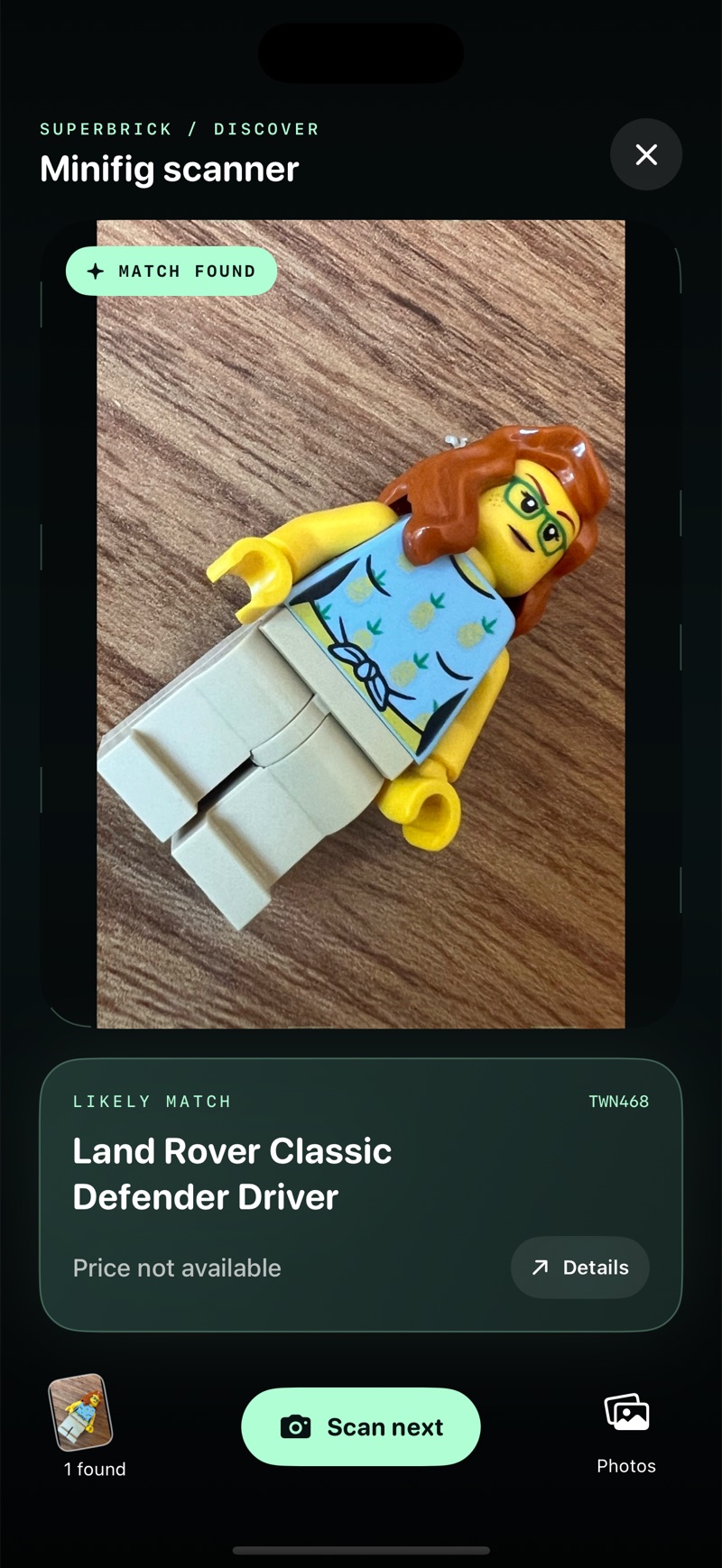
The recorded scan suggests twn468, Land Rover Classic Defender Driver. Start with the printed pineapple shirt and glasses, then compare the hair and legs. Keep the full catalog image beside the actual figure while you check.
If one feature disagrees, do not force the result to fit. The photo may be unclear, another variant may be closer, or the figure may combine parts from several entries. Use Change or another photo before deciding what to save.
If the result is uncertain
Try a closer, sharper photo with less glare and no obstruction across the torso. Keep the complete figure in frame. If several variants still look plausible, compare the catalog details before adding one. A successful visual match does not authenticate a figure or prove the origin of a physical copy.
The example on this page shows a likely match for a Land Rover Classic Defender Driver and no available price. Identification and price coverage are separate: a figure can be recognized without having a quote.
What happens after identification?
Explore the figure’s known set appearances, save a confirmed figure, or review available estimates. Five successful minifigure scans are included as a starting allowance; Pro unlocks further scans. Photos are sent to an online identification service, so this is not an offline scanner.
Go deeper on a difficult match
Repeated characters and similar armor need a more careful comparison. Start with the feature that differs, rather than choosing the first recognizable character name.
Questions collectors ask
How do I identify loose LEGO minifigures without a box?
Photograph the complete figure, compare candidate catalog entries, and verify each visible part. A box is not needed for the photo workflow.
Can I identify several figures from one crowded photo?
For this walkthrough, photograph one complete figure at a time. Clear, separate views make the comparison easier; do not rely on a crowded group photo to establish every identity.
Can a photo tell me the figure’s value?
It can help establish which figure to research. Value still depends on the exact variant, condition, completeness and available market data. A scan may return no price.